
Imagine a keyboard that combines retro aesthetics with today’s technology, a blend that promises a timeless typing experience. That’s the EPOMAKER RT100. As we unbox this marvel, we’ll explore its standout features and why it’s generating so much buzz among keyboard enthusiasts. Thanks to EPOMAKER, who provided us with a test unit to prepare this review article.
Review: Testing the EPOMAKER RT100 keyboard out
The initial unboxing experience sets the tone, with the EPOMAKER RT100 presented in a sleek, minimalist box that hints at the quality and thoughtfulness within. As you open the packaging, the first thing that catches your eye is the keyboard’s retro design. This keyboard evokes a sense of nostalgia with its classic color scheme and rounded keycaps, reminiscent of the early days of personal computing. Yet, it doesn’t stop there; the EPOMAKER RT100 is equally focused on modern functionality.

EPOMAKER RT100: Retro design with modern functionality
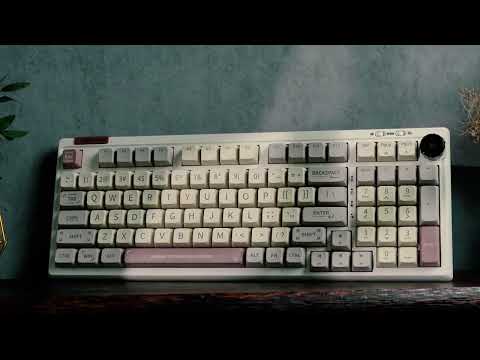
The EPOMAKER RT100 is not just any mechanical keyboard. Its 95% retro mechanical design includes a numpad, making it highly functional for gamers and professionals who need quick access to numerical input. The retro aesthetic is complemented by a multi-media knob and a smart mini display, adding a touch of modern technology to its classic look. The keyboard offers 97 keys (98 for the ISO-UK layout), ensuring you have all the keys you need without the bulk of a full-sized keyboard.

This compact design is good for those looking to save desk space while still enjoying a larger keyboard’s functionality. There is a minimal change from a true 100% design to save some space, but you’ll get used to that last bit over time. That particular spot that challenges me is the area on the right árrow key and the zero on the number pad. If you use the numpad a lot, you might need to be careful not to press the arrow going right instead of the number zero. Eventually, you’ll learn not to do that, so it’s not a huge complaint, as it’s probably not sold as a 100% layout keyboard.
Multimedia knob and smart mini display
One of the standout features of the EPOMAKER RT100 is its multi-media knob and smart mini display, also known as the mini TV. The knob allows you to control various media functions like volume and playback with ease. It adds a tactile element to your multimedia experience, making it more intuitive to use. Other than some simple potentiometers, this one also features a play/pause function, which is incredibly useful in my books for those moments when you don’t even know what tab plays media when you urgently want to hit pause or have a muted moment.

The smart mini display is a customizable screen that can show everything from the date and time to weather forecasts and keyboard battery levels. It adds an extra layer of functionality and personalization, making your keyboard not just a tool but a part of your daily routine. You can also download a GIF animation into the display for decoration, but having to run and sync this from a separate software that needs to run in the background for this to work was a bit too much for me. If you are not plugged in and wired up permanently, the keyboard battery naturally draws a lot of power. It’s a fantastic plaything, but I didn’t end up using it all the time. You can see that mini-display in the video below.
Connectivity options on the EPOMAKER RT100
The EPOMAKER RT100 offers multiple connectivity options to suit your needs. You can choose between Bluetooth 5.0, 2.4G wireless, and a Type-C wired connection. This versatility ensures that you can use the keyboard with a variety of devices, whether you prefer a wireless setup for convenience or a wired connection for stability.

Moreover, Bluetooth connects the keyboard to up to three different devices simultaneously. This feature is incredibly useful for those who switch between multiple devices, allowing seamless transitions without needing to reconnect each time.
Compatibility with Windows and macOS
The EPOMAKER RT100 is designed to be compatible with both Windows and MacOS, making it a versatile choice regardless of your operating system. Whether you’re using it for gaming on a Windows PC or typing up reports on a MacBook, the keyboard performs reliably across different platforms.

Switching between operating systems is simple, and the keyboard even supports iOS and Android devices. This flexibility ensures that no matter what device you’re using, the EPOMAKER RT100 has you covered.
EPOMAKER RT100 user experience and performance
Having tested the EPOMAKER RT100 myself, I can attest to its performance and user experience. The typing feel is satisfying, thanks to the Epomaker Sea Salt Silent Switches. These switches offer a smooth, quiet typing experience, making them ideal for both work and play.

If you prefer a seriously tactile, clacky, and noisy typing sound, you might need to consider a different set of switches or a different keyboard. The Sea Salt Silent switches, though, make you more lovable in a shared office without ruining the typing experience.
Pros and cons
These points are certainly subjective and relative to the version I had to test. Read into the facts, but they might mean more or less to you, depending on your needs and preferences.
Pros
- The keyboard works fantastically with the number pad (“numpad” or “numblock”).
- Versatile connectivity options should enable the keyboard to be used with most setups.
- You get a great typing feel with silent switches.
- The media-control knob that stands out very positively with the push-to-pause function.
- Even the USB cable in the box was somewhat retro-themed and absolutely nailed it as much as a cable can help the product design.

Cons
- The ISO-DE (QWERTZ) layout has a wrong label printed on two keys, which defeats the purpose of getting a localized layout to have 100% correct print on the keys. This could have been easily prevented during a quality assurance process. To be precise, the key :; should have been printed as ;, and next to it, the key “, should be printed as :. (just on top of the Alt Gr key).
- Customization software can be complex for beginners and needs to run all the time for data sync.
- There is only one color option if you want layouts like the ISO-DE or ANSI-KR product version, which is okay because that one is good, but I would have loved others as well.
- The Umlaut-keys ÖÄÜ are, for an unknown reason, printed in a different font style and in a different position of the keys, making them look ugly and standing out a lot in a negative way. This might be another printing mistake that could also appear in other versions of this keyboard.
Technical specifications
Some aspects of a good keeb can be confusing. Make sure to read our keyboard guide as well to understand the terms and features like layout sizes, sockets, switches, anti-ghost, and similar aspects.
- Model: Epomaker RT100
- Layout: 95% | 97 keys (ISO-UK: 98 Keys) + 1 knob
- Hot-swappable: Kailh Switch Sockets
- Keycap Material: PBT
- Keycap Profile: MDA
- Connectivity: USB-C/Bluetooth 5.0/ 2.4G wireless (with USB-A dongle)
- Battery Capacity: 5000mAh
- LED Direction: South-facing
- Ghost Keys: NKRO/anti-ghosting
- Dimension: 397 x 147 x 30 mm
- Weight: 1.35kg

Conclusion
The EPOMAKER RT100 is a feature-rich mechanical keyboard that blends retro aesthetics with modern functionality. Its unique design, versatile connectivity options, and comprehensive customization features make it a standout choice for mechanical keyboard fans, writers, tech enthusiasts, and gamers. I liked using this keyboard a lot because it’s one of the few with a great design that also comes with a numpad as well as a localized key layout, but I like my keys a little louder than the silent switches this one came with.
Looking for an alternative? Check our review of the EPOMAKER TH80 Pro
The keyboard is priced at $115.99 on the EPOMAKER website, which is a fair price given its extensive feature set, remaining competitive compared to rival products. Depending on the model you are looking for, you might also find yourself getting a good deal via Amazon, where they also have the RT100 in various options. If you’re looking for a well-rounded mechanical keyboard that offers both style and substance, the EPOMAKER RT100 is certainly worth considering.
YouTube: 【Showcase】Have You Tried A Keyboard With Mini TV? | Epomaker RT100 Keyboard (promotional clip)
By clicking play, you agree to YouTube's Terms of Service and Privacy Policy. Data may be shared with YouTube/Google.
Photo credit: All images shown were taken by Christopher Isak for TechAcute.
Editorial notice: We have been provided with a test unit of the EPOMAKER RT100 to prepare this review article but were not paid to write this article.
